Free infinite canvas
NOTES / SHAPES / ARROWS / NO LOGINThink on a board with no edges.
A whiteboard for sticky notes, shapes, arrows, drawings and pictures. It runs in your browser, needs no account, and keeps your boards on your own device.
Open the canvas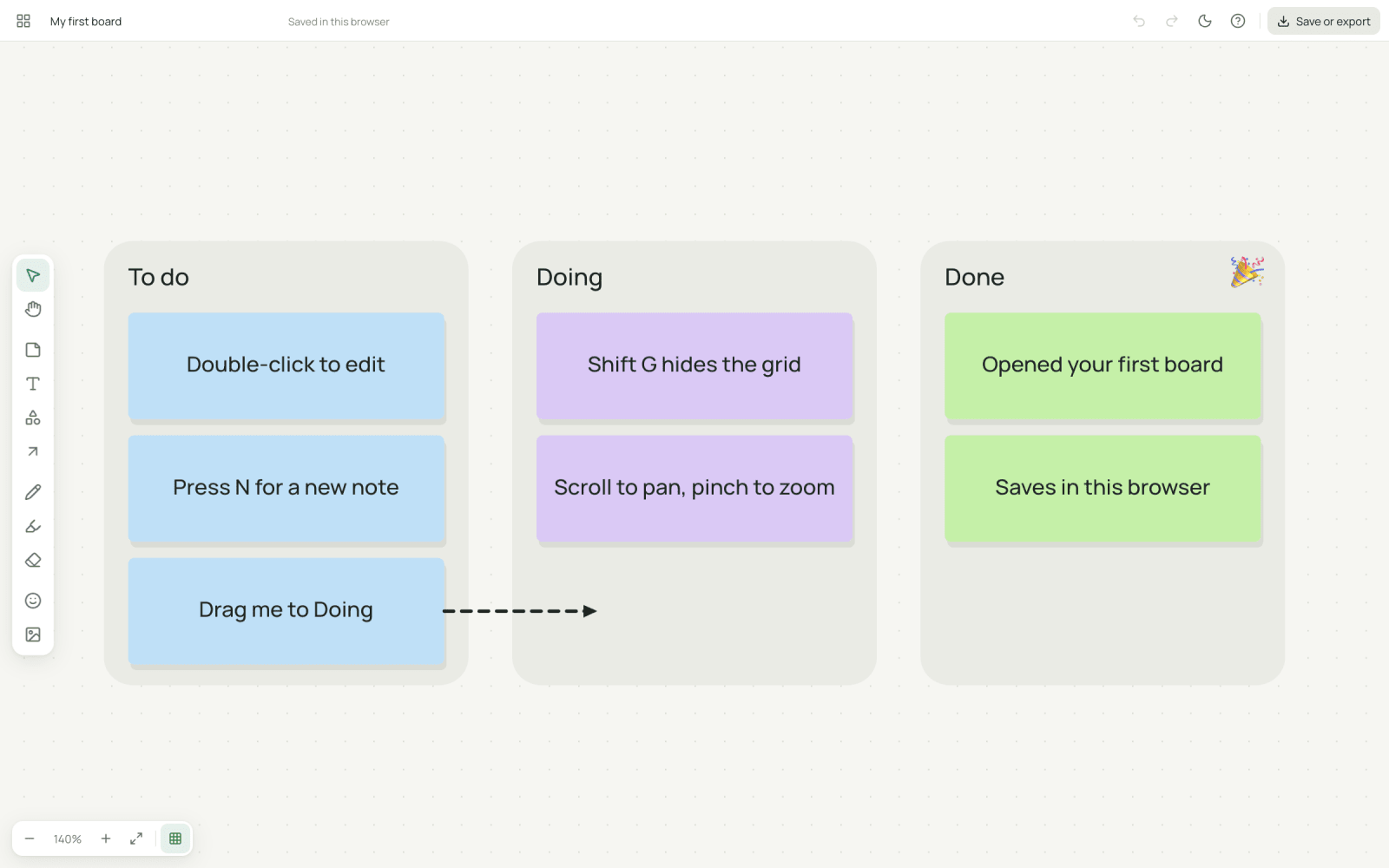
Everything a quick board needs
- Sticky notes that fit their text
Pick one of eight pastel colours and type. The text grows or shrinks to fill the note, and you can set a size by hand when you would rather.
- Text, shapes and lines
Add text boxes, rectangles, rounded rectangles, ellipses, diamonds and lines. Shapes take a fill, an outline and text inside.
- Arrows that stay attached
Drag an arrow from one note or shape to another. Move either one and the arrow follows, so a flow chart stays connected while you rearrange it.
- Pen, highlighter and eraser
Draw freehand in nine colours and four widths, mark up a note with the highlighter, and wipe a stroke away with the eraser.
- Emoji stickers
Drop a thumbs up, star, check mark or heart onto the board from a set of common emoji. Stickers resize and rotate like any other object.
- Pictures
Drag in a picture, paste one, or pick files from your device. Large images are scaled down to 2048 pixels on the long side and stored on your device.
- Pan and zoom without edges
Scroll, pinch or hold space and drag to move around. Zoom to fit shows the whole board, and a board of about a thousand objects stays smooth in testing.
- Light and dark, with a grid you can hide
The whole app follows your system theme, and a button in the top bar switches it. A dotted grid helps you line things up, and a button or Shift G turns it off. Both choices are remembered on your device.
- Many boards, saved as you go
Keep as many named boards as you like. Create, rename, duplicate and delete them from the board list. Each one saves itself in this browser, on this device, a moment after every change. Nothing is uploaded to a server. Clearing your browser data deletes your boards, so save a .shinboard file as a backup.
- Save a file, export a picture
Save a .shinboard file that holds the board and its pictures, then open it again later or send it to someone. Export the whole board or a selection as a PNG or a PDF.
What people put on an infinite canvas
- Brainstorming
Dump ideas on sticky notes, drag them into groups and circle the ones worth keeping.
- Mood boards
Paste pictures, add colour blocks and short notes, and arrange them until the direction is clear.
- Kanban boards
Make To do, Doing and Done columns, put a note on each task and drag them across as the work moves.
- Retrospectives
Make three columns, let each person's notes go in, then draw arrows from problems to actions.
- Planning
Lay out steps as shapes, connect them with arrows and move them around as the plan changes.
- Study notes
Put a topic in the middle, branch out from it, and add sketches and highlights as you learn.
A free whiteboard that needs no login
Miro and FigJam are made for teams who work on one board together, live. This canvas is for working alone. You open it, put your thoughts down, and keep or share a file. In return there is no sign-up, no board limit that we set, and nothing leaves your device. It does not do real-time collaboration, comments or templates, so if your team needs those, use a tool built for them. If you want a quick board for your own thinking, or you cannot create accounts on a work or school computer, this works in a browser tab.
Three steps to a finished board
- 01Open a board
Press the button below. A blank board opens straight away, with no account to make.
- 02Add things
Pick a tool from the toolbar or press its letter: N for a note, T for text, P for the pen, A for an arrow. Drag things around, resize them and undo anything.
- 03Keep it
The board saves in your browser by itself. For a backup, or to send it to someone, use Save file.
Boards live in this browser only
Nothing you draw or type is uploaded. Boards are stored in your browser on the device you are using, so they do not follow you to another device or browser. Clearing your site data deletes them. Use Save file to download a backup, and open it from the board list whenever you need it.
Frequently asked
Is this infinite canvas really free?
Yes. There is no account, no board limit, no watermark on exports and no paid tier, and the site shows no ads. It is a one-person project with an optional tip jar. The canvas runs in your browser, so there is no server bill that grows with each user.
Where are my boards saved?
In your browser's own storage (IndexedDB) on the device you are using. Boards save automatically a moment after each change, and nothing is sent to a server. That also means a board exists only in that browser: it will not appear on your phone or in a different browser.
Can I lose my boards?
Yes, if you clear your site data, use a private window, or the browser clears storage to free space. The canvas asks the browser to keep its storage, but browsers may decline. Use Save file inside a board to download a .shinboard backup, and open it from the board list whenever you need it.
Can several people work on one board at the same time?
No. There is no real-time collaboration, no comments and no shared links, because that would need a server and accounts. To share a board, save the file and send it. The other person opens it from their own board list and gets their own copy.
What can I put on a board?
Sticky notes in eight colours whose text shrinks or grows to fit, text boxes, rectangles, rounded rectangles, ellipses, diamonds and lines, arrows, freehand pen and highlighter strokes, emoji stickers, and pictures. You can move, resize, rotate, duplicate, copy and paste objects, change their order, and undo any step.
How do the arrows work?
Drag an arrow from one note or shape to another. Its ends attach to the objects, so when you move either one the arrow follows and stays connected. Drag an end of the arrow away to detach it, or onto another object to attach it there.
How do I get my work out of the canvas?
Use Save or export. Save file gives you a .shinboard file that holds the whole board with its pictures and can be opened again here. Export PNG or PDF draws the whole board, or only your selection. PNG can have a transparent background. PDF is one page the shape of your board.
Can I use dark mode or hide the grid?
Yes to both. The canvas starts in whichever mode your device uses, and the sun and moon button in the top bar switches the whole app between light and dark. The grid button next to the zoom controls, or Shift G, shows or hides the grid. Your choices are remembered in this browser, and the grid is never part of an exported PNG or PDF.
Does it work on a phone or tablet?
Yes. On a touch screen one finger uses the tool you picked, two fingers pan and pinch to zoom, and pressing and holding an object opens a menu of actions. The toolbar moves to the bottom of the screen. We recommend Chrome on Android, since that is what has been tested.
Which browsers does it work in?
We recommend a Chrome-based browser such as Google Chrome, Brave or Microsoft Edge, because that is where the canvas has been built and tested. It uses standard browser features, so other browsers may work, but we do not make promises about them.
How big can a board get?
There is no fixed limit. The canvas only draws what is on screen, and a board of about a thousand objects stays smooth in testing. Speed and storage depend on your device. Large pictures are scaled down to at most 2048 pixels on the longest side before they are stored.
How is this different from Miro or FigJam?
Miro and FigJam are built for teams who work on a board together, live. This canvas is a single-user whiteboard: you open it, think, and save a file. In exchange it needs no login, has no board limit that we set, and keeps everything on your device. If you need live teamwork, use a tool built for it.
Open a blank board
It is free, with no signup, watermark or ads.